Skip to content
RA — Rohit Agnihotri, home
Resume ↓

Retention · Techjockey · Shipped · 3 min read

Post-transaction lifecycle journeys

After a buyer requests a demo, calls or pays, how do you give them a reason to come back?

I moved Techjockey's buyer messaging from CleverTap to MoEngage and rebuilt it around what each buyer had just done. Every key moment (cart, payment, demo, call) got an email about that moment, and three lifecycle journeys went live: welcome, re-engagement (personalised by the buyer's last category) and win-back, with follow-ups planned by lead source. The returning-user rate rose from 10% to 18% within 90 days, with a 5% journey CTR.

At a glance

Returning-user rate within 90 days
10% → 18%
Journey click-through rate
5%
Lifecycle journeys: welcome, re-engagement, win-back
3
Role
Product Manager · User pod lead
Context
Shipped at Techjockey
Format
MoEngage journeys + email templates
Stack
MoEngage · CleverTap · GA4 · SQL · Email · Segmentation

The problem

A buyer's relationship with Techjockey usually starts with one action: a lead, a demo or call request, a cart or a payment. Once that moment passed, buyers had little reason to come back, and the returning-user rate sat at 10%.

How I made the call

Six stages, from one-off buyers to the result. The schematics are illustrative; every number on them is real.

  1. The pattern was the same across the funnel: one action (a lead, a demo or call request, a cart or a payment), then nothing. The messages buyers did get weren't about what they had just done, and only one buyer in ten came back.

    Evidence

    Schematic

    The relationship usually starts with one action

    • A lead
    • A demo or call request
    • A cart
    • A payment
    That momentthen little reason to come back
    Returning-user rate10%

    One square in ten: buyers who came back

  2. What a buyer just did, and where they came from, already says what they need next. Someone who requested a demo needs reassurance and a date. Someone who left a cart needs a way back to it. Someone who came in through a blog post on HR software needs more about HR software.

    Insight

    Schematic
    The signalWhat they need next
    • Just didRequested a demo

      Reassurance and a date

    • Just didLeft a cart

      A way back to it

    • Came fromA blog post on HR software

      More about HR software

    Intent + source → the next message

    Messages follow what each buyer did, not a calendar.

  3. Journeys can only be as personal as the events behind them. So I first moved buyer-side tracking and messaging from CleverTap to MoEngage, with an event map for each property, a comms sheet, documentation and a migration plan, and treated the tracking gaps found after migration as bugs.

    Data first

    From the spec
    CleverTapMoEngagebuyer-side tracking and messaging

    An event map for each property

    • Main site
    • Blog
    • Enterprise site
    • Campaign landing pages

    Buyer events, for example50+ in the map

    • Product Viewed
    • Category Viewed
    • Added to Cart
    • Added to Compare
    • Payment Initiated
    • Payment Failure
    • Charged
    • Renewal Order
    • Demo Requested
    • Call Missed

    Each carries properties such as category, product, plan and price.

    Gaps found after migration, fixed as bugs

    • Review parameters missing on events
    • MoEngage SDK missing from blog pages
    • US site: logged-in users' events on a guest profile
  4. Every key action now triggers an email about that action, and each follows the same shape: confirm what just happened, link back to the product, then one or two clear actions. After a lead, a one-question email asks whether the buyer's requirements were met, to show who still needs help.

    Decision
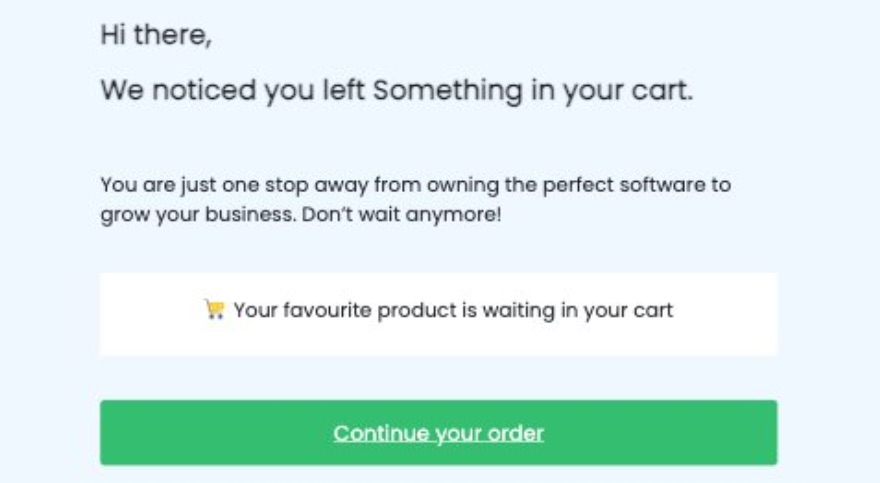
    The revamped cart email: a line noting the buyer left something in their cart, a box saying their product is waiting in the cart, and a Continue your order button
    The revamped cart email, from the MoEngage export
    1. Confirm what happenedThe cart was left unpaid

    2. Link back to the productStill waiting in the cart

    3. One clear next stepContinue your order

    The same shape for every key moment

    • Cart left unpaid
    • Viewed, not added
    • Payment failed
    • Payment link
    • Demo requested / confirmed
    • Call requested / connected / missed / rescheduled
    • After a lead: requirements met? Yes / No
  5. Three MoEngage journeys went live: welcome, re-engagement and win-back. Re-engagement runs on 90-day activity and is personalised by the buyer's last category. Alongside them, a content plan set what each type of lead hears next, depending on how they arrived.

    Journeys

    Schematic

    Three MoEngage journeys

    • Welcome
    • Re-engagement
    • Win-back
    Welcome
    Feature discovery beyond the product that brought them in
    Re-engagement
    90-day activity, personalised by last category, such as accounting, billing, CRM or HR

    What each lead hears next, by how they arrived

    Product page
    Feature snippets, reviews, a related case study
    Category
    Category insights, assessment questions, a poll
    Facebook lead form
    An intro to the category and Techjockey, what happens next
    Blog
    Key points from the post, category and product insights
    Landing page
    Similar requirements, a data sheet
  6. The returning-user rate rose from 10% to 18% within 90 days, with a 5% click-through rate on the journeys.

    Result

    To scale

    10% → 18%returning-user rate

    Before10%
    10% returning-user rate
    Within 90 days18%
    18% returning-user rate
    Journey click-through rate
    5%
    Journeys live
    3

What I built

Three MoEngage lifecycle journeys (welcome, re-engagement and win-back), plus rewritten emails for each key moment.

  1. Moment emails

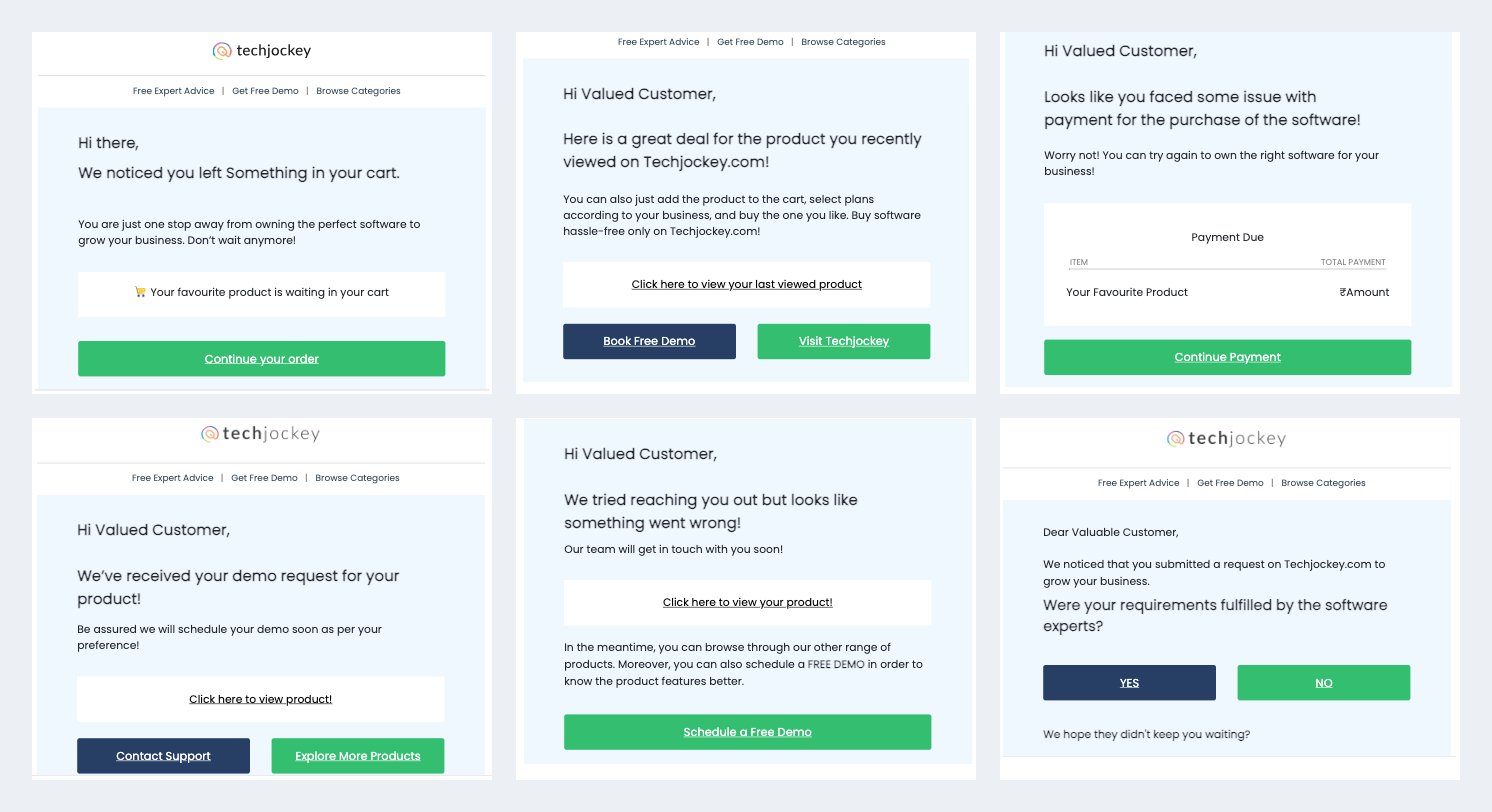
    Every key action triggers an email about that action: cart left unpaid, product viewed but not added, payment failed, payment link, demo requested or confirmed, call requested, connected, missed or rescheduled. Each confirms what happened, links back to the product and offers one next step: continue the order, book a free demo, explore similar products or contact support.

  2. Requirement check

    After a lead, a one-question email ("Were your requirements fulfilled by the software experts?" Yes / No) shows who still needs help.

  3. Welcome · feature discovery

    Shows new users what they can do on the platform beyond the one product that brought them in.

  4. Re-engagement · 90-day activity

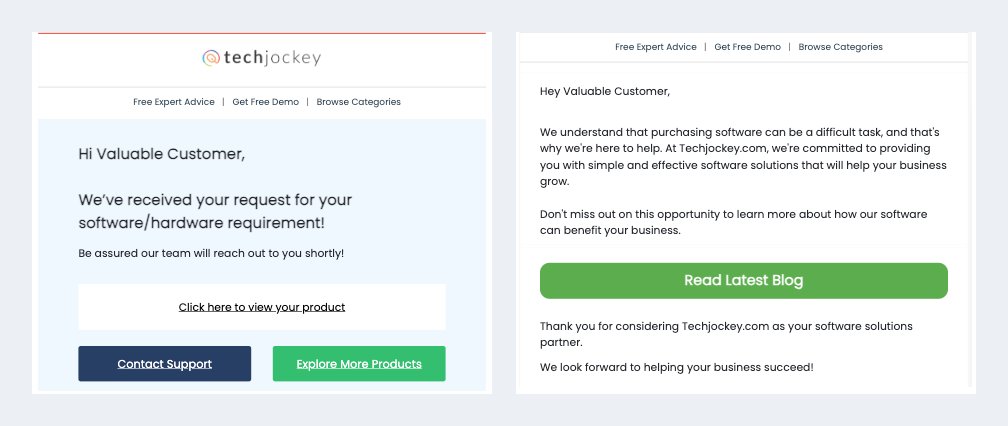
    The 90-day User Engagement Journey starts with a request confirmation, then gives reasons to come back: what the platform offers (discover features, book demos, compare products, read reviews, ask experts), the latest blog, and short videos covering tech news, top software by category and tutorials.

  5. Personalised by last category

    Retargeting audiences were built per category (for example accounting, billing, CRM and HR) from each buyer's last enquiry, so the message matches what they last looked at.

Same platform, different message by source

The content plan behind the retargeting work: what each type of lead hears next depends on how they arrived.

Lead sourceWhat they get next
Product page leadFeature snippets or a product page preview, a follow-up question to understand the need better, customer review snippets, a related case study
Category leadWhat the category covers, top category insights to decide better, assessment questions that enrich the lead, category case studies or newsletters, a Q&A snippet, a poll
Facebook lead-form leadAn intro to the category and to Techjockey, and what will happen next and how we'll help
Blog leadKey points from the post they read, category insights, product insights (features, pricing, reviews), what happens next, the newsletter
Landing page visitorSimilar requirements across product and category, and a data sheet for the product or category
Six rewritten Techjockey emails: cart left unpaid, a deal on a recently viewed product, payment failed with a Continue Payment button, demo request received, missed call with a Schedule a Free Demo button, and a Yes / No question asking whether the buyer's requirements were met (opens full size in a new tab)
Moment emails: each confirms what happened, links back to the product and offers one next step
Two emails from the 90-day User Engagement Journey: one confirming the buyer's software requirement was received, one inviting them to read the latest blog (opens full size in a new tab)
From the 90-day User Engagement Journey in MoEngage

Want to talk through this?