As a product manager, you’re always balancing your users' needs with your business's goals. You’re focused on delivering features, driving user engagement, and ensuring your product succeeds. But page speed is one often-overlooked factor that could make or break your product’s success.
In today’s fast-paced world, users expect websites and apps to load instantly. If they don’t get what they want within a few seconds, they’re gone. So, as a product manager, improving page speed isn’t just a technical task — it’s a key lever for improving user experience, driving conversions, and boosting your business’s bottom line.
Why does page speed matter so much?
You’ve probably heard the stats, but they’re worth repeating: If a webpage takes more than three seconds to load, more than half of users will leave. And here’s the kicker: this leads to higher bounce rates, lower conversion rates, and lost revenue. A slow site is not just a frustration for users, it also harms your SEO rankings. Google has confirmed that page speed is a ranking factor, so if your site is slow, it’s less likely to appear at the top of search results.
That means every second counts. Slow load times can push potential customers away, directly impacting user engagement, sales, and growth. But here’s the good news: improving page speed is one of the simplest and most effective ways to boost your product’s success.
The Link Between Page Speed and User Experience
Think about your own experiences on the web. Have you ever clicked on a link only to sit there staring at a blank screen while the page loads? Frustrating, right? The same happens to your users. Page speed is critical to user experience.
When your site loads quickly, users are happy and more likely to stay, explore, and engage. On the flip side, if it’s slow, they’ll abandon the page in frustration and head to a competitor. This is where you, as a product manager, come in. You need to optimize for speed to keep your users engaged and happy.
Here are a few quick wins for improving page speed:
1. Database Optimization
- Index Frequently Queried Columns: Create indexes on the columns that are frequently used in searches or joins. This can significantly reduce query execution times.
- Optimize SQL Queries: Avoid using SELECT * and instead explicitly specify the columns needed. Use tools EXPLAIN to analyze query performance and identify bottlenecks.
- Use Database Query Caching: Implement caching strategies to store the results of frequently run queries, so they don’t have to be re-executed, improving speed.
2. Code Optimization
- Minimize and Bundle Files: Reduce the number and size of JavaScript and CSS files by combining them. This decreases the number of requests the browser makes to the server.
- Asynchronous Loading: Use async and defer attributes for non-essential JavaScript to ensure they don’t block page rendering and can load in parallel.
3. Server Configuration
- Optimize Server Settings: Ensure your server is configured for optimal performance by tuning settings for maximum connections, caching, and response time.
- Use HTTP/2: HTTP/2 can reduce load times by allowing multiple resources to be loaded in parallel over a single connection, improving overall page speed.
4. Infrastructure Optimization
- Scale Server Resources: If your website has high traffic, consider scaling your servers or using auto-scaling cloud infrastructure to handle spikes in demand.
- Use Load Balancing: Distribute traffic across multiple servers to ensure no single server gets overwhelmed, leading to faster response times.
5. Frontend Optimization
- Minimize HTML, CSS, and JavaScript: Remove unnecessary white spaces, comments, and unused code to reduce file sizes. Tools like UglifyJS can help minify your scripts.
- Implement Lazy Loading: Only load images, videos, and other heavy elements when they come into view, improving initial load speed and reducing unnecessary downloads.
6. Compress Images
- Large, uncompressed images are one of the biggest culprits for slow load times. Use image optimization tools like TinyPNG or ImageOptim to compress images without compromising quality.
7. Minimize Requests
- Every time a page loads, it sends requests to the server for images, scripts, and other resources. Reduce the number of requests by combining CSS and JavaScript files, eliminating unnecessary plugins, and removing unused resources.
- Also, consider reducing the use of third-party scripts or advertisements that can add extra overhead and delay page loading.
8. Use a CDN
- A Content Delivery Network (CDN) stores copies of your website’s content across multiple global servers. This ensures that users load your site from the nearest server, significantly reducing latency and improving load times, especially for users in distant regions.
By making these basic changes, you’ll see a greater impact that keeps users happy and coming back for more.
Key Page Speed Metrics You Need to Track
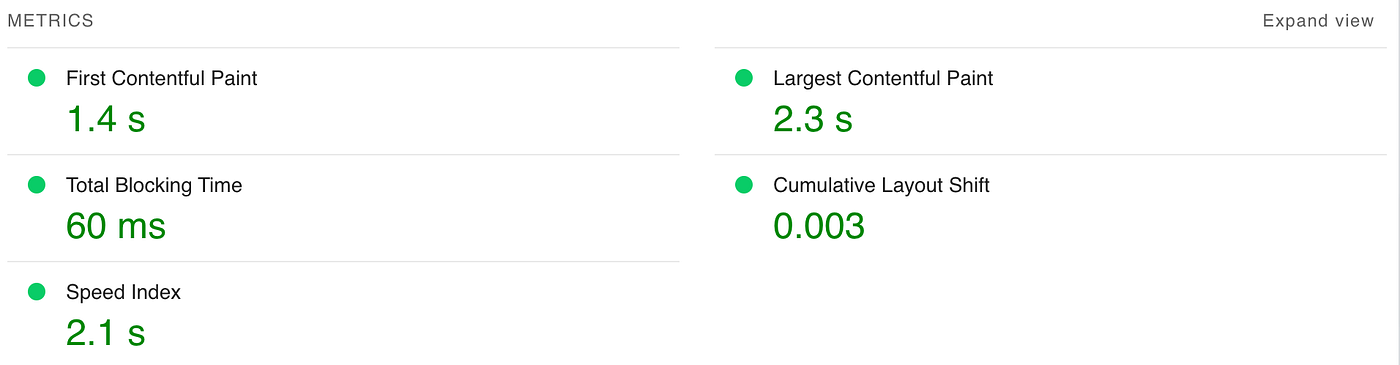 Page Speed Metrics
To improve page speed effectively, it’s important to track the right metrics. Here are the core performance indicators that will help you understand how fast your site is and where improvements can be made:
- Time to First Byte (TTFB)
TTFB measures how long it takes for the browser to receive the first byte of data from your server. A slow TTFB can indicate server configuration issues or network delays. - First Contentful Paint (FCP)
FCP tracks how quickly users see any content (text, images, etc.) on the page. - Speed Index
The Speed Index measures how quickly the visual content of your page loads. It reflects the overall experience of the user as they see content appear. - Time to Interactive (TTI)
TTI measures when your page becomes fully interactive — meaning users can click, scroll, or engage with content. If TTI is slow, users won’t be able to interact with your page right away. - Cumulative Layout Shift (CLS)
CLS measures the visual stability of your page. It tracks unexpected layout shifts that occur when elements move around while the page is loading, leading to a jarring experience for users (e.g., buttons moving unexpectedly).
By tracking these metrics, you’ll gain a clear picture of where your site is underperforming and what to focus on to improve load times.
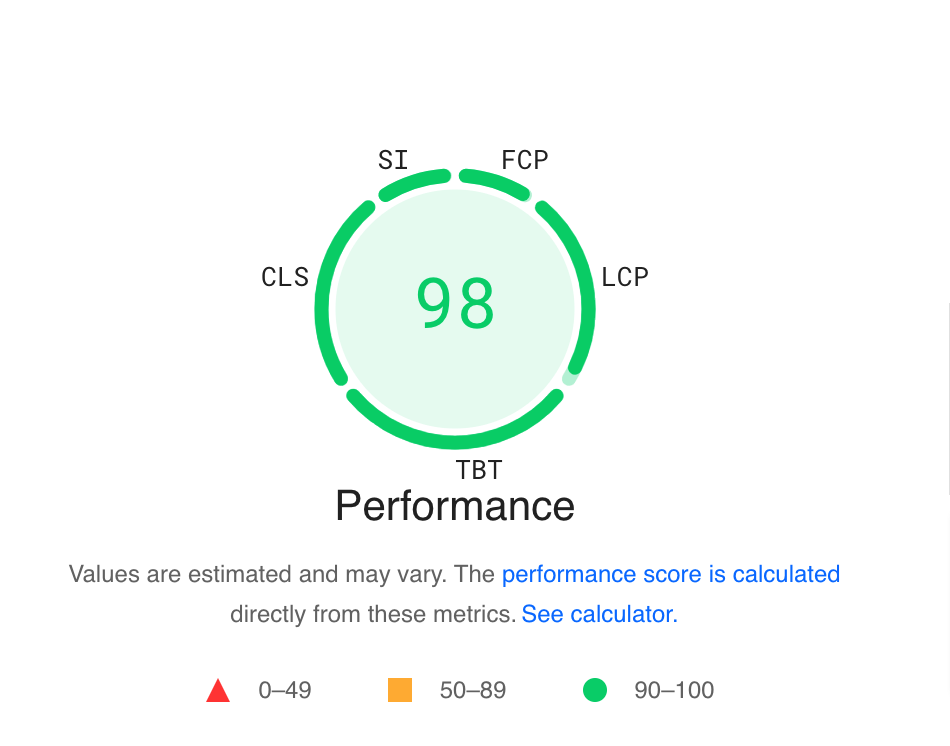 Page Performance Score
Setting Practical Page Speed Goals
To ensure your product is performing at its best, setting clear and realistic page speed goals is crucial. Here’s how to approach it:
- Analyze Competitors
Start by evaluating your competitors’ page speeds. Identify their strengths and weaknesses and learn from their approach. This can provide valuable insights into best practices you can implement on your own site. - Benchmark Against Industry Standards
Every industry has different expectations when it comes to page speed. E-commerce sites, for instance, need lightning-fast checkout experiences to convert users. In contrast, blogs may allow slightly more leeway. Set goals based on what users in your sector expect. - Align Speed Goals with Business Objectives
Ensure your page speed goals are aligned with broader business goals. If you’re focused on increasing conversions, prioritize speed improvements on critical pages like the checkout or registration process. For sites relying on ad revenue, make sure pages with high traffic and ad impressions are optimized.
Tools to Measure and Improve Page Speed
There’s a wealth of tools available to help you measure and optimize page speed. These tools can provide valuable insights and actionable recommendations:
- Google PageSpeed Insights
Google’s free tool provides performance scores for both mobile and desktop versions of your site, along with specific recommendations to improve speed. It’s one of the most accessible and widely used tools for optimizing page load times. - Lighthouse
Lighthouse, available in Chrome DevTools, is an open-source tool that audits your website’s performance, accessibility, SEO, and best practices. It helps you evaluate all aspects of site performance, not just speed, ensuring your site is optimized for all users. - Custom Monitoring Solutions
For a more tailored approach, you can develop custom monitoring solutions. Set up alerts to track any significant performance dips or integrate performance data into your existing analytics tools, such as Google Analytics or Mixpanel, to keep tabs on speed in real-time.
Conclusion
Page speed isn’t just a technical challenge — it’s a critical factor in user experience and business performance. As a product manager, understanding and optimizing page speed is part of your responsibility to deliver an exceptional product. By tracking key metrics, setting targeted goals, and leveraging the right tools, you can ensure your website or app performs at its best.
A faster product means happier users, higher conversion rates, and better overall business results. So, make page speed a priority — and watch your product soar.